CyberRedeem Open in Telegram

Shuffle codes,
claimed for you

Your own cloud browser, signed in to your Shuffle account, claims every promo code seconds after it drops — day and night, with your computer off.

•••••••• —
Real Shuffle drops from the last hours, replayed at the speed our customers’ cloud browsers claimed them.
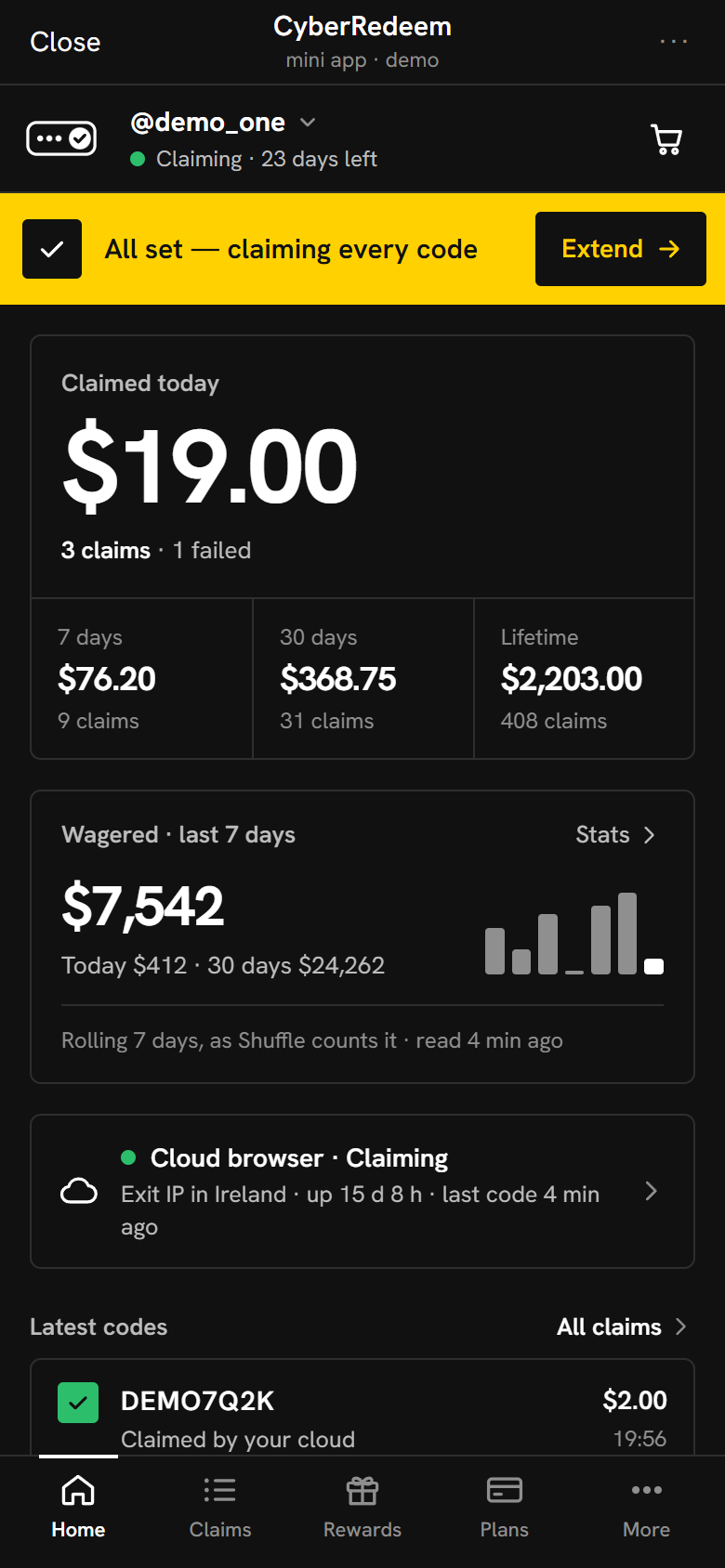
The CyberRedeem Mini App home screen: the account is claiming, today’s claimed total, the amount wagered on Shuffle in the last 7 days with a small bar per day, the cloud browser’s status and the latest code.
The Mini App · demo with sample data

1 / 11 Speed

Scroll to move sideways

Measured, not promised

—

median from the moment a Shuffle code appears to the first claim by a customer’s cloud browser

—

9 in 10 codes claimed within this

—

Shuffle codes measured in the last 30 days

—

claims made by customers’ cloud browsers in 30 days

—

claimed for customers in 30 days

The latest Shuffle drops

Recent Shuffle codes: masked code, value, time to first cloud claim, number of cloud claims, when it dropped
CodeValueFirst claim afterClaimed byDropped
Loading the latest drops…

Codes appear 10 minutes after they drop · checking every minute

How we measure: for each Shuffle code in the last 30 days, the time from when our watchers first saw it to the first successful claim by any customer’s cloud browser. Codes appear here masked; private stream drops never.

What did you miss?

Shuffle codes drop around the clock, and many run out within minutes. Say when you’re usually away — asleep, at work — and see what the last 7 days of real drops looked like in those hours.

Loading the last 7 days of drops…

Real Shuffle drops from the last 7 days, in your time zone; private stream drops aren’t counted. Code value is what one claim of each code pays — whether an account can claim a code depends on Shuffle’s rules for it (recent wager, VIP level, how many may claim).

From the drop to your balance

Codes appear in Telegram channels, on the Shuffle forum and on stream. Here is what happens to one, on a clock that starts when it appears.

  1. 0 sA code is posted

    In a Telegram channel, on the Shuffle forum or on a Kick stream. We watch all of them, around the clock.

  2. right awayEvery cloud browser gets it

    The code goes straight to each customer’s cloud browser — no queue, no batching.

  3. ≈ 4 sClaimed in your account

    Your browser redeems it on Shuffle in your own signed-in session, in the coin you picked.

  4. afterYou see what happened

    Claimed, skipped or failed — with the reason in plain words, in the Mini App and the companion.

Your computer can be off

Each customer gets their own server. Every Shuffle account on it runs in its own browser with its own proxy and its own signed-in profile — nothing is shared with other customers.

Signs in once
With your Shuffle email, password and code, or a session token. Your password is used to sign in and never kept.
Stays signed in
The browser keeps your session, so it claims at 4 a.m. the same as at 4 p.m.
Ends cleanly
When a plan runs out, claiming stops. The browser is kept for an hour so a quick renewal carries on signed in, then it is removed.

Cash out straight to Shuffle New

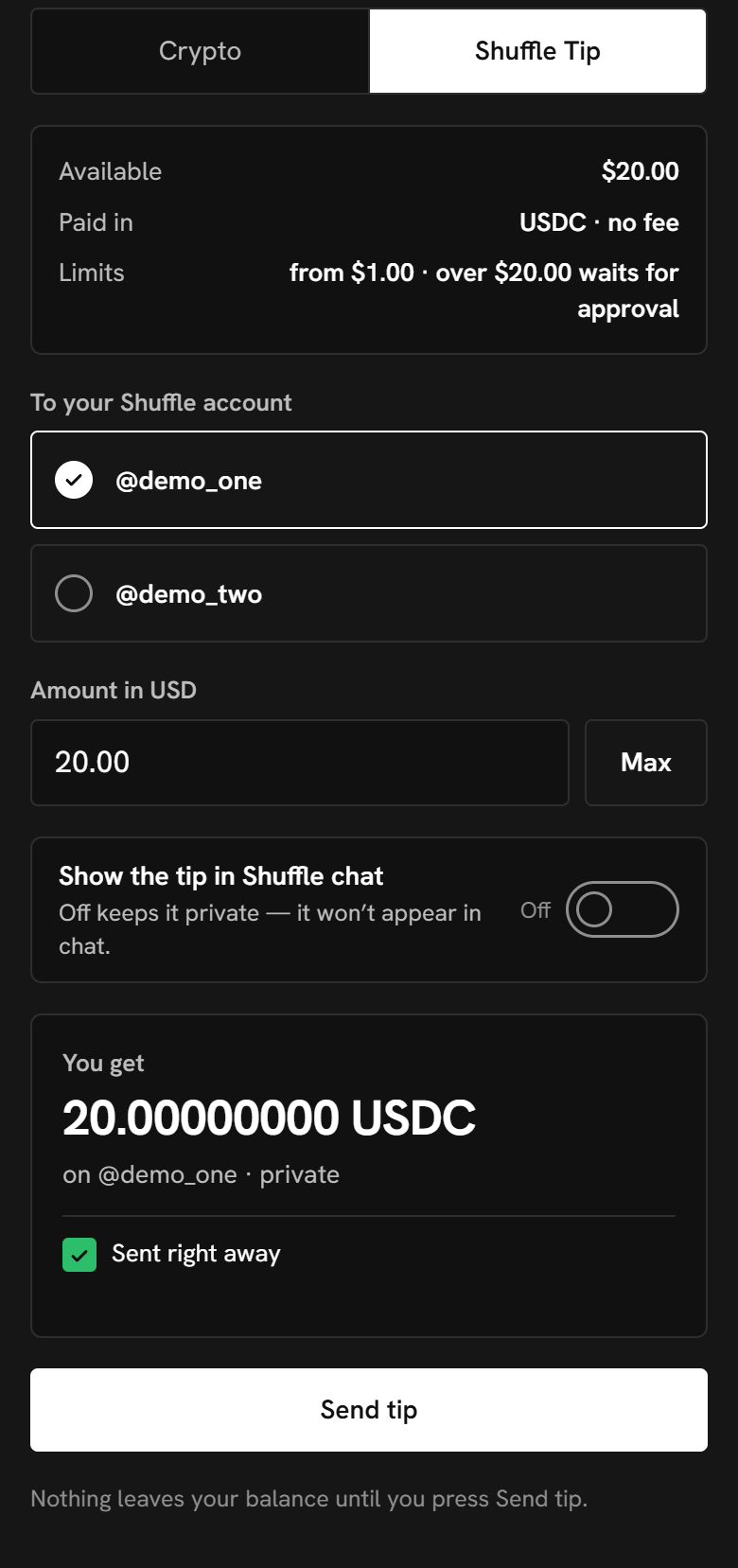
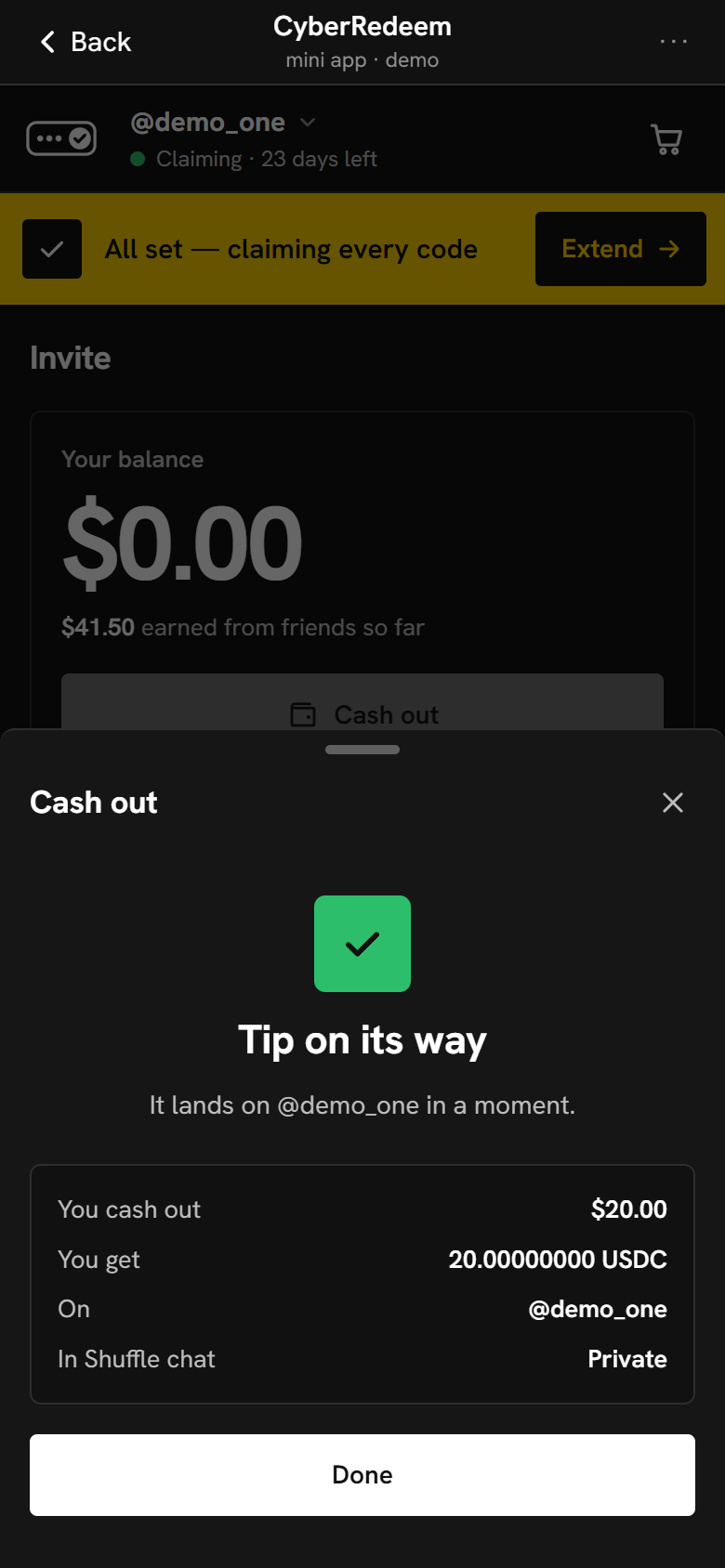
Your referral balance, paid as a USDC tip to your own Shuffle account — no wallet, no address, no network to pick. Private by default.

The Mini App after cashing out: “Tip on its way — it lands on @demo_one in a moment”, $20.00 cashed out as 20 USDC on @demo_one, private in Shuffle chat.
The Mini App · Shuffle Tip cash-out · sample data
  1. 1
    Cash out

    On the Mini App’s Invite page, from the balance your friends’ plans earned you.

  2. 2
    Shuffle Tip

    Pick one of your own Shuffle accounts. Paid in USDC with no fee, and kept out of Shuffle chat unless you switch it on.

  3. 3
    Sent

    Small tips go out right away; larger ones wait for a quick check by us.

  4. 4
    On your Shuffle balance

    It lands as a tip from CyberRedeem — and with tip alerts on, Telegram tells you.

Three accounts, one Telegram

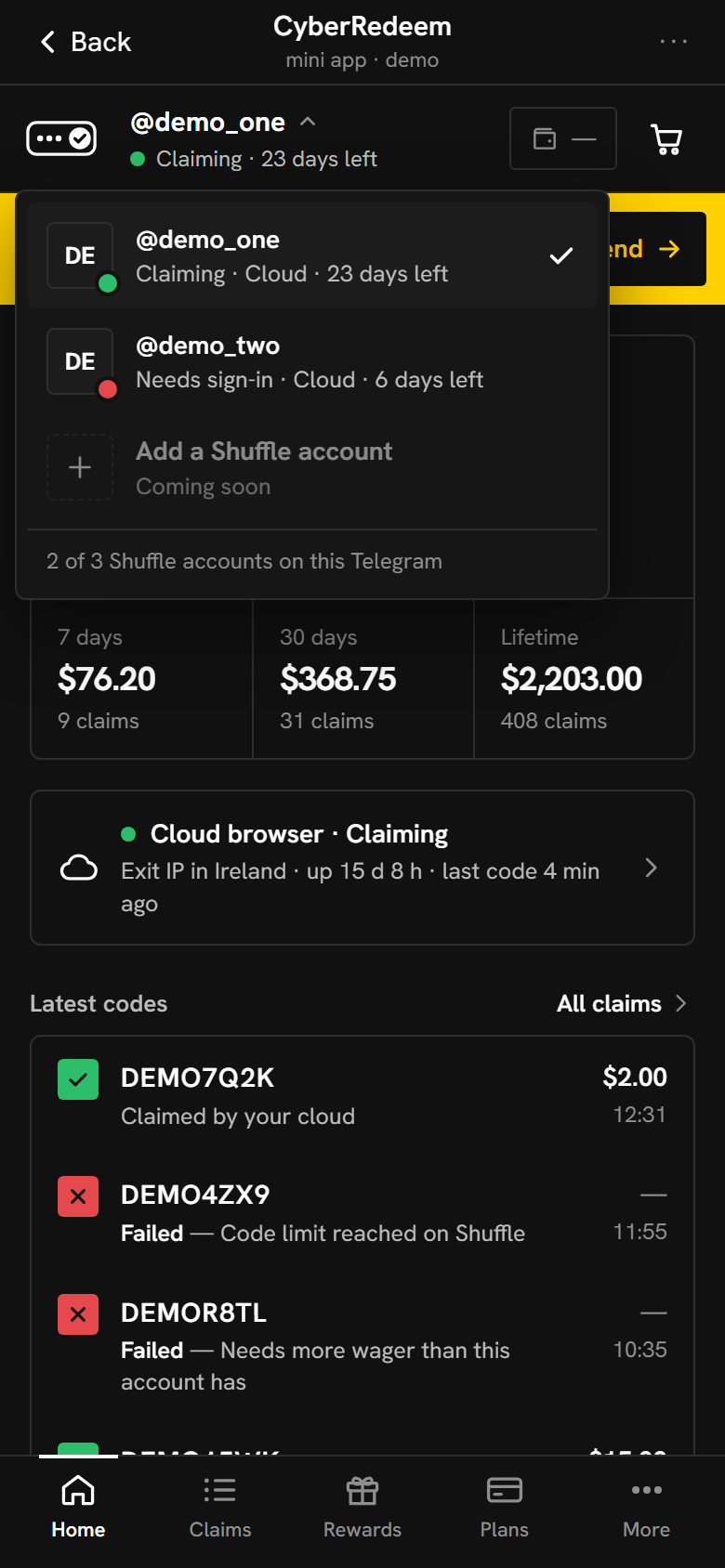
Add up to three Shuffle accounts to your Telegram. Each one gets its own cloud browser and its own plan; switch between them at the top of the Mini App.

Full pricefirst account
—off the second
—off the third

The discount applies to renewals too, always off the normal price. A Shuffle account belongs to the first Telegram that connects it; only our support can move it.

The Mini App’s account switcher listing two Shuffle accounts, one claiming and one waiting to be signed in again.
Account switcher · preview with sample data
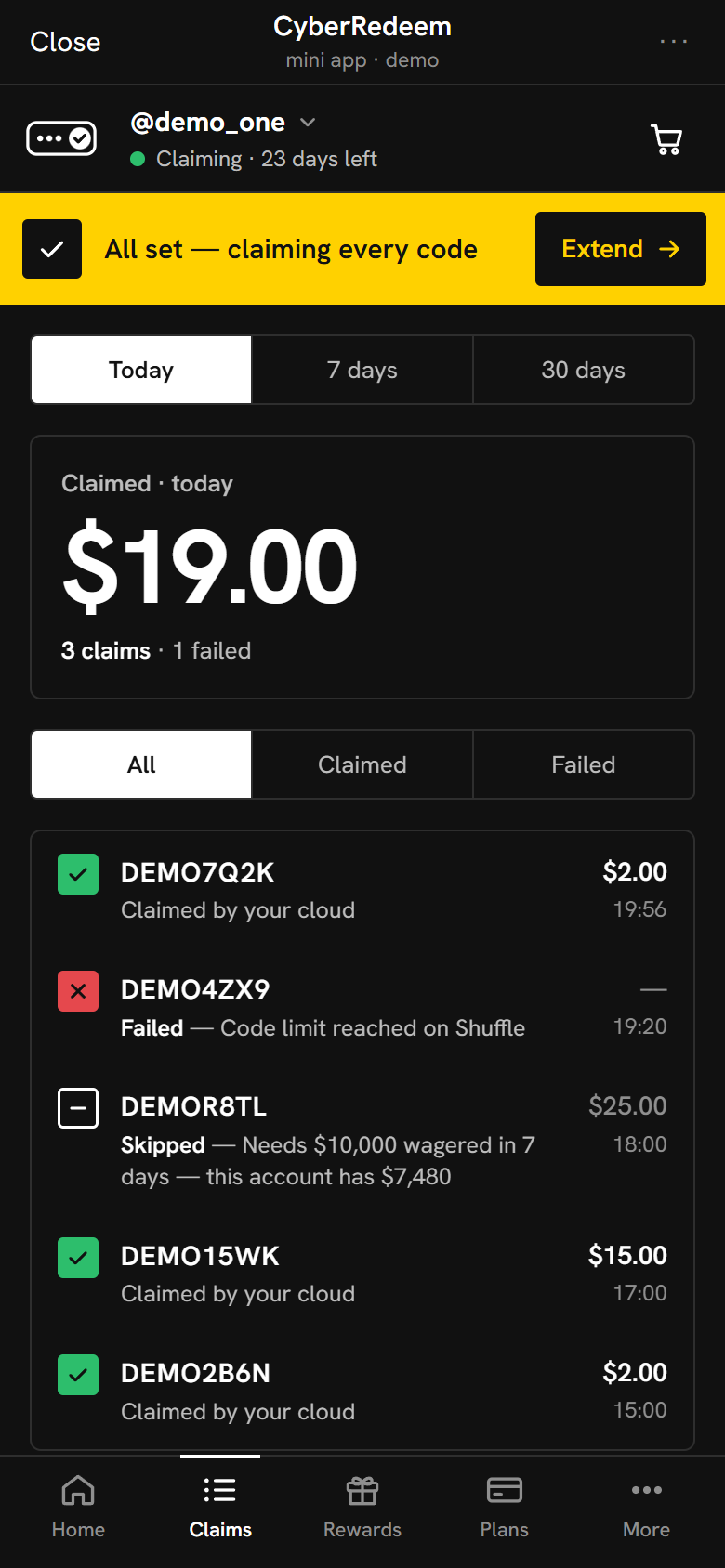
The Claims list: claimed codes with a green tick, a failed code with a red cross and Shuffle’s reason, and a skipped code that needs $10,000 wagered in 7 days while the account has $7,480.
Claims · preview with sample data

Every code, explained

You see every code that reached your account and what happened to it — no guessing why a drop didn’t land.

  • Claimed

    The value, the coin and how many seconds it took.

  • Failed

    Shuffle’s answer in plain words: the code ran out, it needs more wager, it expired.

  • Skipped

    Codes this account doesn’t qualify for yet, left out on purpose: “Needs $3,000 wagered in 7 days — this account has $101.” No wasted attempt, and you see exactly why.

Your 7-day wager, without asking support

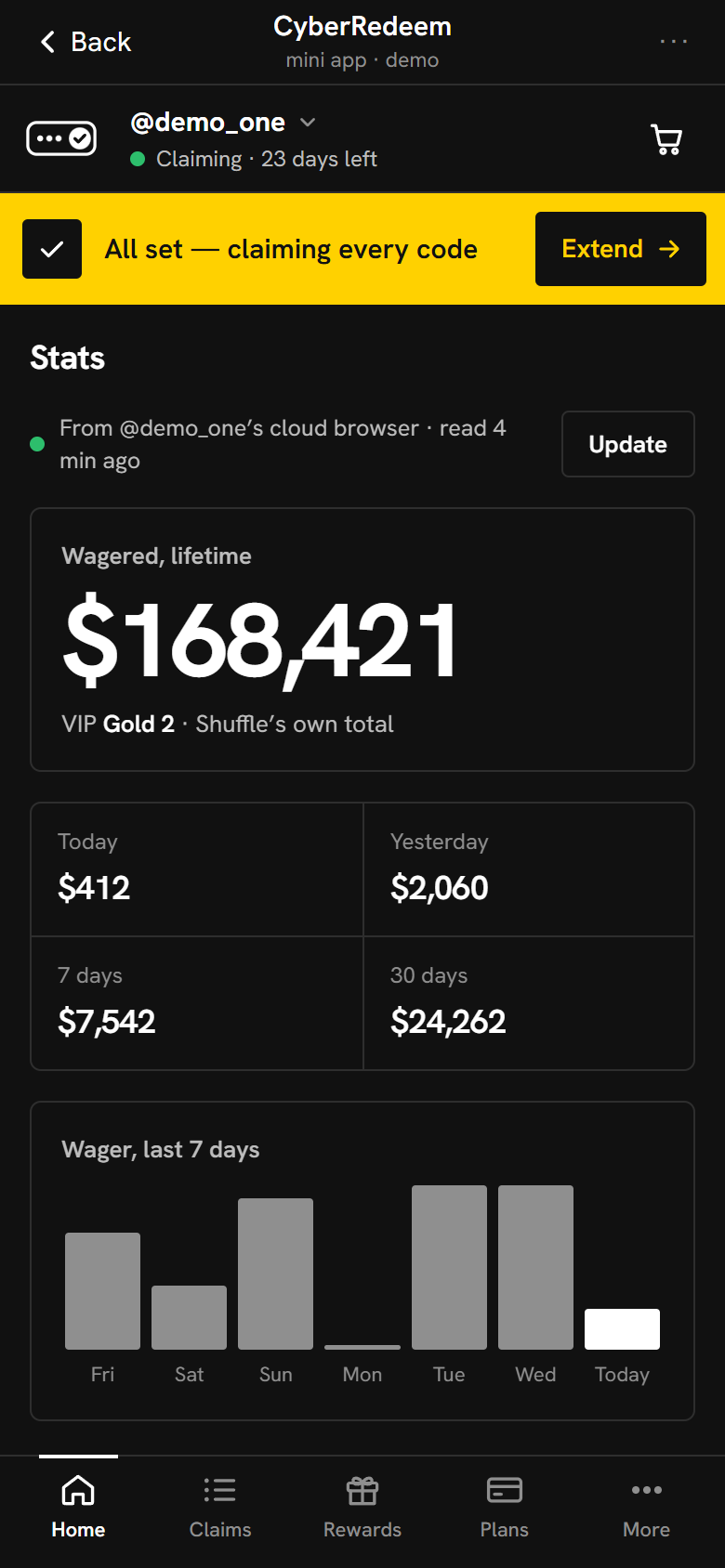
Many Shuffle codes only work if you wagered enough in the last 7 days, and Shuffle doesn’t show you that number. The Mini App does, right on Home: the rolling 7 days as Shuffle counts them, today, the last 30 days and a bar for each day.

Read from your own account
Your cloud browser reads your bet history on Shuffle. Nothing to type in, nothing to export.
One tap for the rest
Lifetime wager and VIP progress, profit and loss by period, and your place in the weekly race.
No wasted claims
Codes that need more 7-day wager than the account has can be skipped, and Claims tells you by how much.
The Mini App’s Stats page: $168,421 wagered in total, VIP Gold 2, wager for today, yesterday, 7 days and 30 days, and a bar for each of the last 7 days.
Stats · preview with sample data

A board beside the game

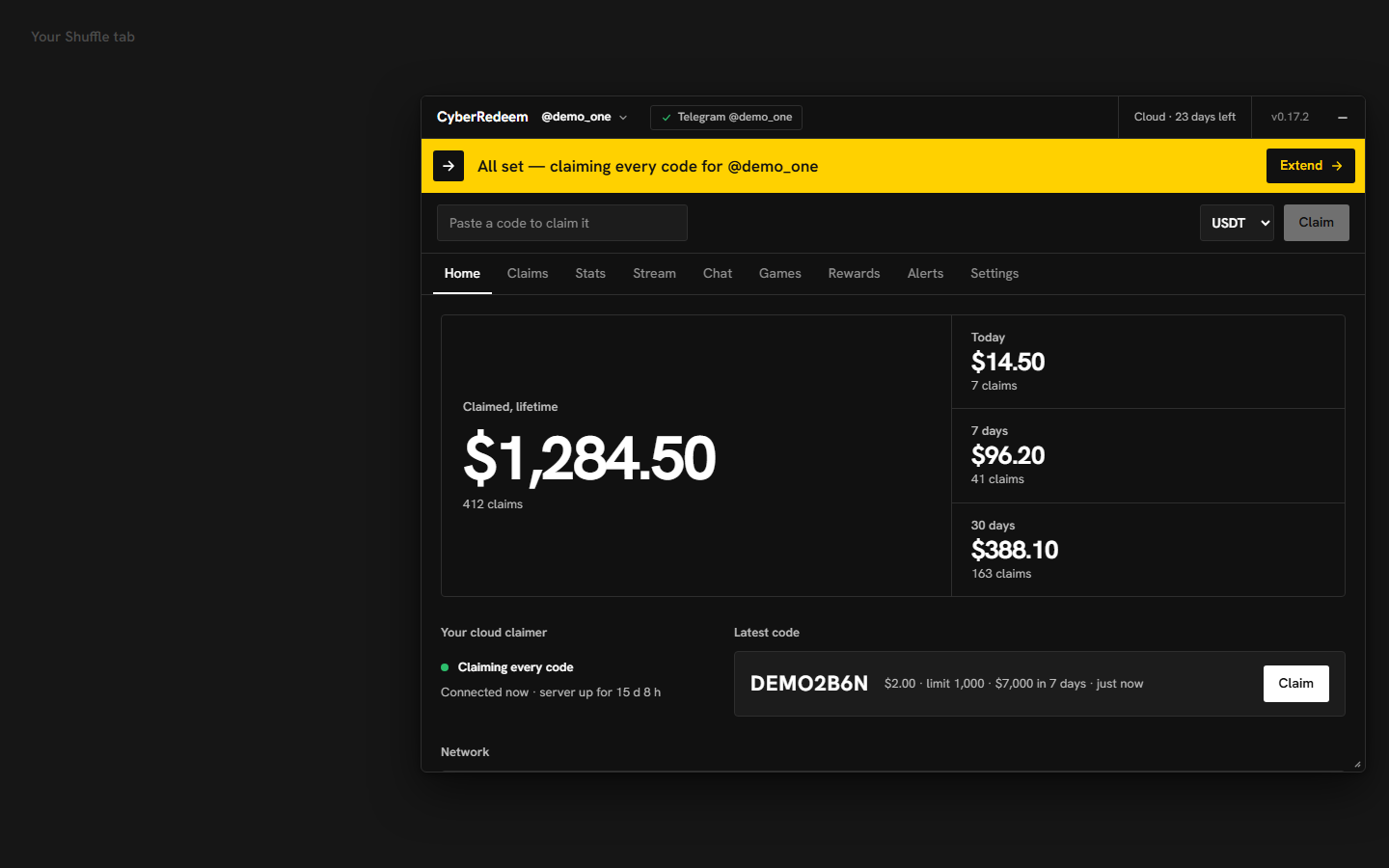
On Shuffle, the companion script adds a small board in your desktop browser. It shows what your cloud browser is doing, your claims and stats, rewards waiting and alerts — and changes your settings without leaving the page. The claiming itself stays in the cloud.

Install the companion · needs Tampermonkey

The companion board floating over a Shuffle tab: a yellow band saying all set, claiming every code; tabs for Home, Claims, Stats, Stream, Chat, Games, Rewards, Alerts and Settings; lifetime, today, 7-day and 30-day claimed totals.
The companion board · demo with sample data

Told on Telegram

Pick what you want to hear about, per account: tips and rain, rewards ready, a new VIP level, the moment a stream starts — and Shuffle’s chat. Say a keyword and you get the whole message at once; players you follow arrive bundled, one message a minute.

With a cloud plan, your cloud can also claim rakeback and bonuses as soon as Shuffle opens them, and tell you what it got. Codes always go first.

  • Tips and rainOn
  • Claim rewards automaticallyOn
  • Chat keywordsOn
  • Stream startsOff
CyberRedeem

Tip received on Shuffle — @demo_one
@demo_friend sent you 2.00 USDT ($2.00)

CyberRedeem

Rewards claimed for you on Shuffle — @demo_one
Daily rakeback $1.20 · Weekly bonus $4.10
Total ≈ $5.30

Claimed automatically by CyberRedeem

CyberRedeem

@player_c in English chat: anyone know when the next airdrop is?

keyword “airdrop” · alerts for @demo_one

CyberRedeem

@player_e in English chat — 3 messages
21:42 rain in 5 min
21:42 be in English for it
21:43 gg all

you follow @player_e · alerts for @demo_one

Example messages
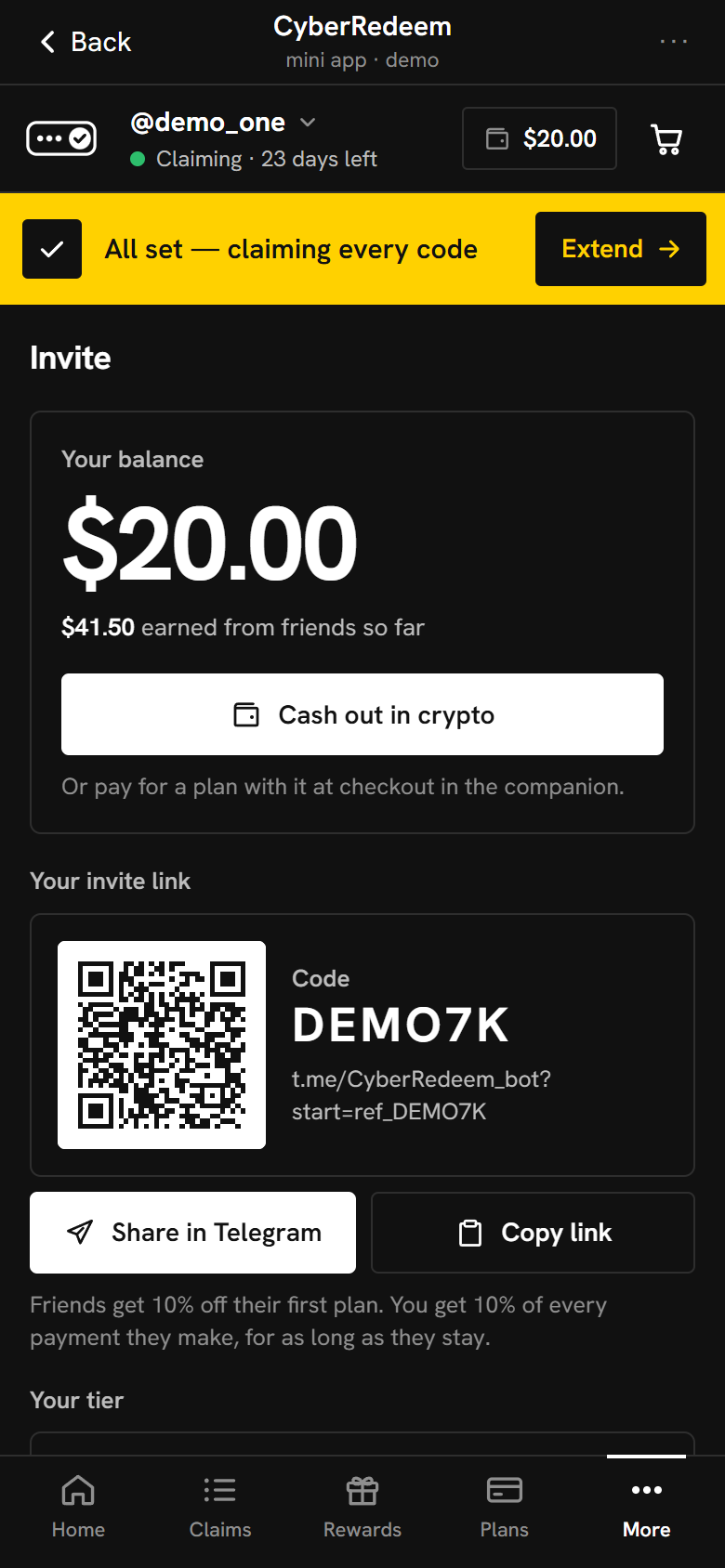
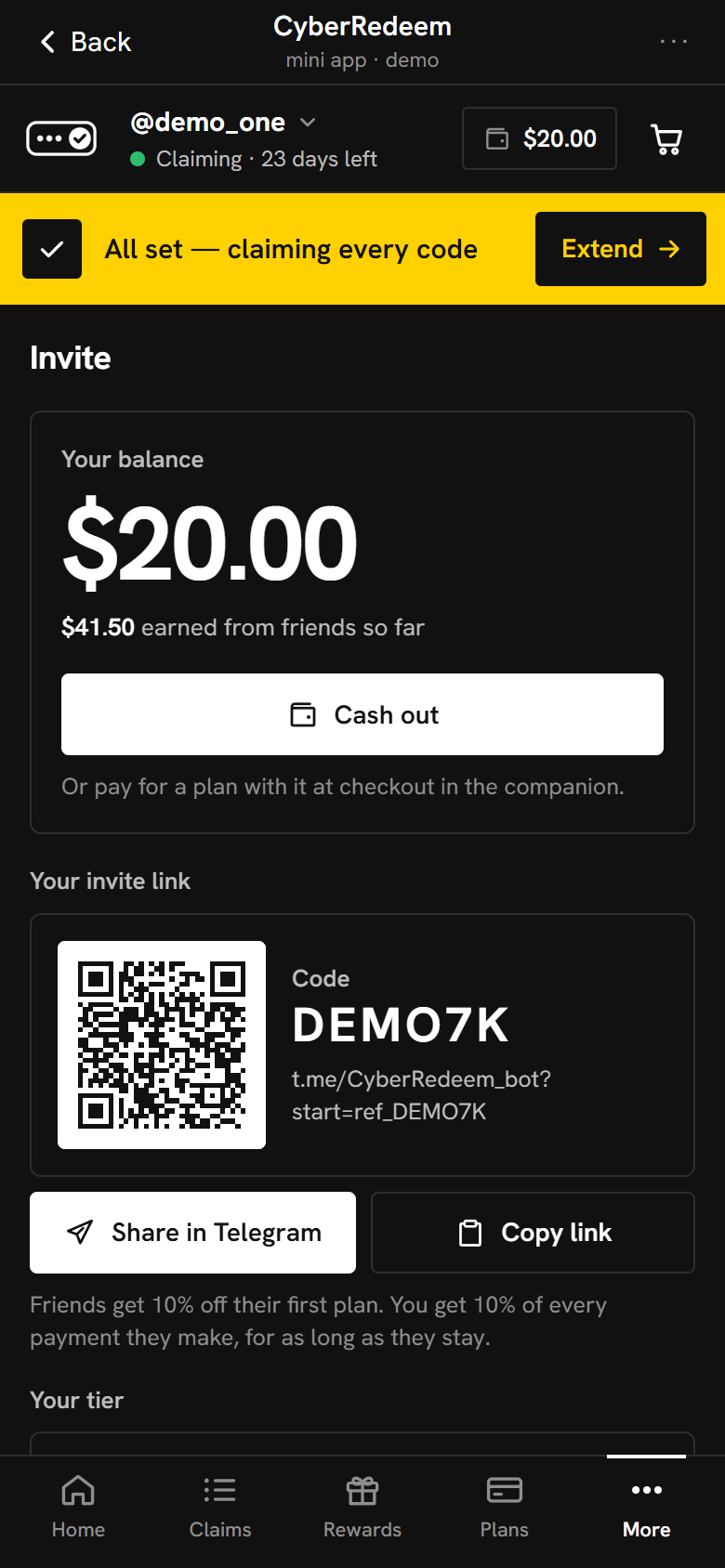
The Mini App’s Invite page: a $20.00 referral balance, $41.50 earned from friends so far, a Cash out in crypto button, and the invite link with its QR code.
Invite · preview with sample data

Invite friends, get paid

Share your link from the Mini App. Friends get 10% off their first plan, and you earn a share of what they pay — 10% to start, up to 15% as more of your friends subscribe.

  • Spend it at checkout

    Your balance pays for your next plan, in part or in full.

  • Cash out in crypto

    To your own wallet. Small cash-outs go out automatically; larger ones are checked by us first.

  • Tip it to your Shuffle account New

    Paid in USDC, straight to your own Shuffle account. Private by default. See how it works

What you earn is yours to spend or cash out as soon as your friend’s payment is confirmed.

Prices

One price per Shuffle account, cloud browser included. Pay in crypto in the Telegram Mini App; the plan starts when the payment arrives.

Plans: name, length, price, price per day
PlanLengthPricePer day2nd account3rd account
Loading the current prices…

Prices are in US dollars and come straight from our live price list. No free trial.

Questions

Do I need to keep my computer or phone on?

No. Your cloud browser runs on our server and stays signed in to Shuffle. Your devices are only for checking on it.

How does it sign in to my Shuffle account?

From the Mini App: with your email, password and the code Shuffle sends you, or with a session token from a browser where you are signed in. The password is used for that sign-in and never stored.

Does it win money for me?

No. It claims the promo codes Shuffle gives away, as you could by hand, only faster. It never bets or plays. What you get depends on the codes that drop and on Shuffle’s rules for each one.

Why did a code fail?

Shuffle decides who can claim a code: many need a recent wager amount or a VIP level, and most run out after a set number of claims. The Claims list shows Shuffle’s reason for each one.

Where do I see my 7-day wager?

On the Mini App’s Home, under today’s claims. Your cloud browser reads it from your own Shuffle bet history and counts a rolling 7 days, like Shuffle does. Tap it for lifetime wager, profit and loss, VIP progress and the weekly race.

How many Shuffle accounts can I add?

Up to three per Telegram account. Each has its own cloud browser and plan, and the second and third are discounted.

What happens when my plan ends?

Claiming stops. Your cloud browser is kept for an hour so a renewal carries on signed in, then it is removed. Your claim history stays.

How do I pay?

In crypto, through OxaPay, inside the Telegram Mini App. A referral balance can pay for a plan too.

How does the referral program pay out?

Your earnings collect as a US-dollar balance on the Mini App’s Invite page. Spend it on a plan, or cash it out in crypto to your own wallet — small cash-outs go out automatically. You can also cash out as a USDC tip straight to your own Shuffle account.

Is CyberRedeem part of Shuffle?

No. CyberRedeem is an independent service and is not affiliated with Shuffle.

Catch the next drop

Open CyberRedeem in Telegram, add your Shuffle account and pick a plan. Your cloud browser starts as soon as the payment arrives.

Start in Telegram
On a computer? Point your phone’s camera here to open CyberRedeem in Telegram.